IoT & Workflow Automation for Your Business
Turn routine tasks into one-touch buttons and let your building, network and collaboration systems react on their own. Perivue connects programmable control panels like Elgato Stream Deck, Cisco IoT and smart-building platforms, and your existing systems into event-driven workflows that save time every day.
Fewer clicks, faster response, smarter spaces
Your team repeats the same steps every day: starting meetings, resetting devices, opening tickets, adjusting rooms, checking dashboards. Your building and network already produce a stream of events that nobody has time to watch. Perivue connects the two. We give people simple physical controls for the tasks they do by hand, and we let systems respond to events automatically, so the right action happens in seconds instead of minutes.
- One-touch control: programmable key panels that run multi-step workflows and show live status.
- Event-driven automation: sensors, cameras, network and calendar events trigger actions with no one watching a screen.
- Built on Cisco: Catalyst and Meraki networks, Cisco industrial IoT, Cisco Spaces and Webex devices.
- Secure by design: IoT devices segmented and profiled on the network, with least-privilege access to every API.
- One accountable partner: from the first workflow review to long-term support.
Stream Deck and programmable control panels
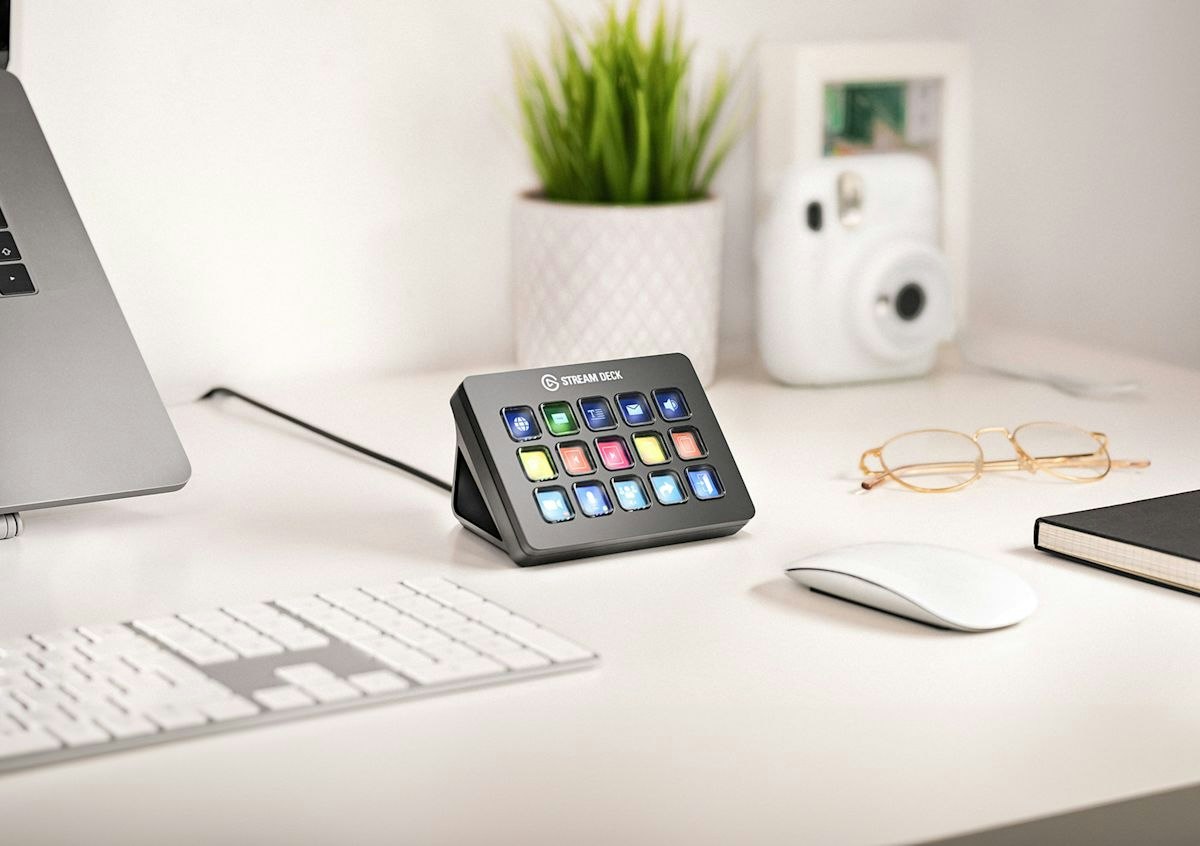
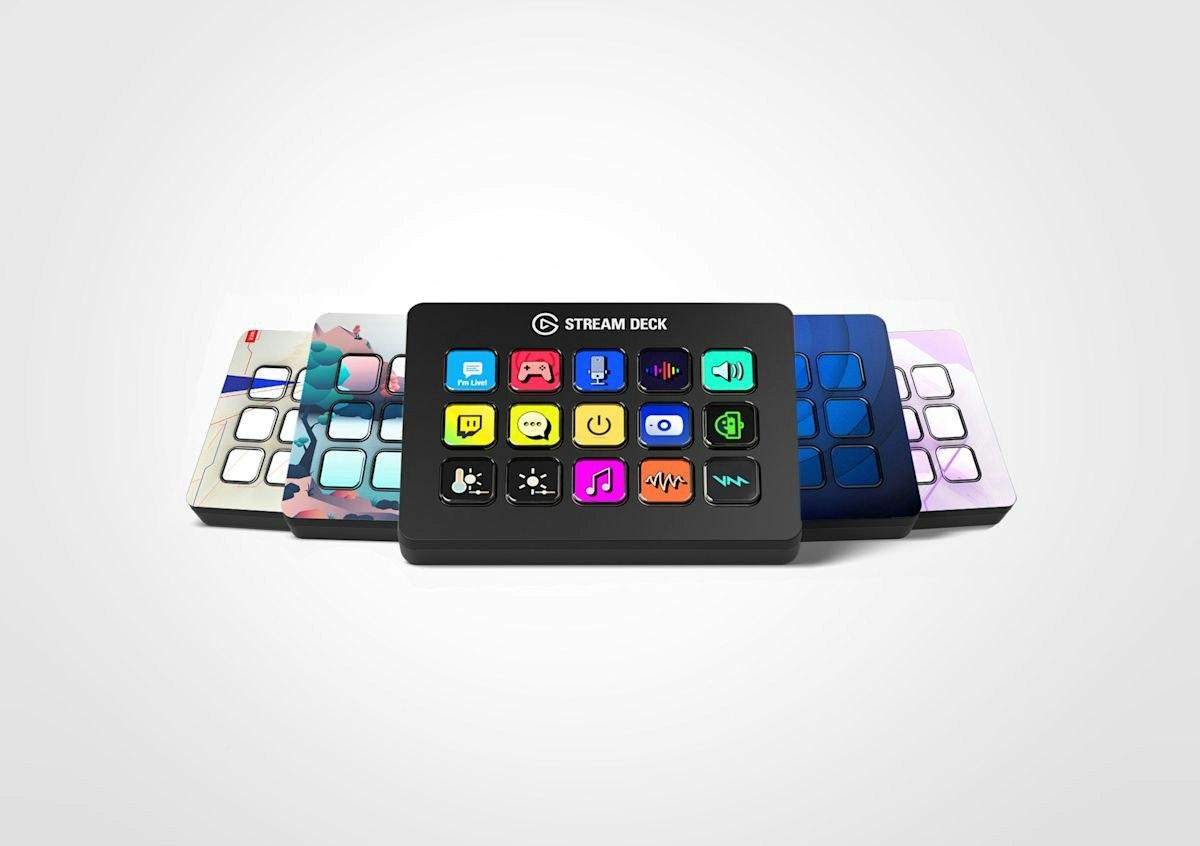
Programmable key panels such as the Elgato Stream Deck put any workflow on a button with a customizable LCD icon. One press can run a sequence of steps across several systems, and the key can change color to show the result. We design the layouts, build the integrations, and deploy them where your people work.
Meeting Rooms & Webex
Join or end Webex meetings, mute and unmute, switch cameras and displays, share content and set room presets, all from one panel on the table or at the lectern.
IT & Network Operations
Bounce a switch port, enable guest Wi-Fi, restart a phone, run a backup, pull a health report or open a ticket with one press, safely, through approved APIs and with every action logged.
Front Desk & Facilities
Overhead paging and mass notification, door release, lighting and climate scenes, visitor check-in and emergency alerts, so reception and facilities staff never hunt through apps.
Presentations, Studios & AV
Control cameras, switchers, recording and live streaming for training rooms, town halls and video studios. Rack-mount panels fit standard 19-inch AV racks.
Corsair, Elgato, Stream Deck, Xeneon and iCUE are trademarks of Corsair. Perivue also works with other programmable keypads and touch panels.
Corsair Xeneon Edge: live status and touch controls on one strip
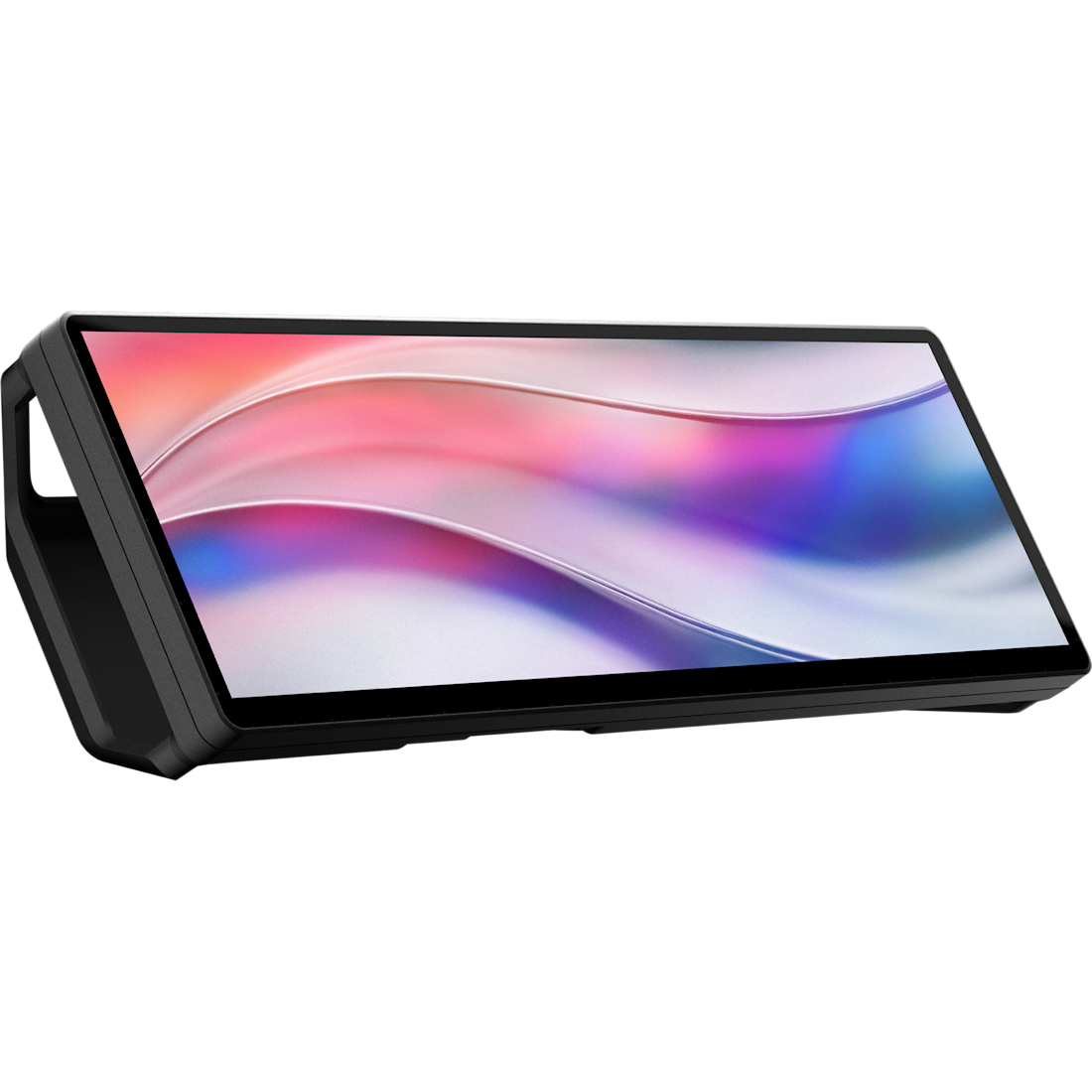
The Corsair Xeneon Edge is a 14.5-inch ultra-wide touchscreen that sits below a monitor, on a desk or on a mount. We turn it into a live operations strip: custom widgets show what matters to your team, and touch buttons run the same workflows as a Stream Deck.
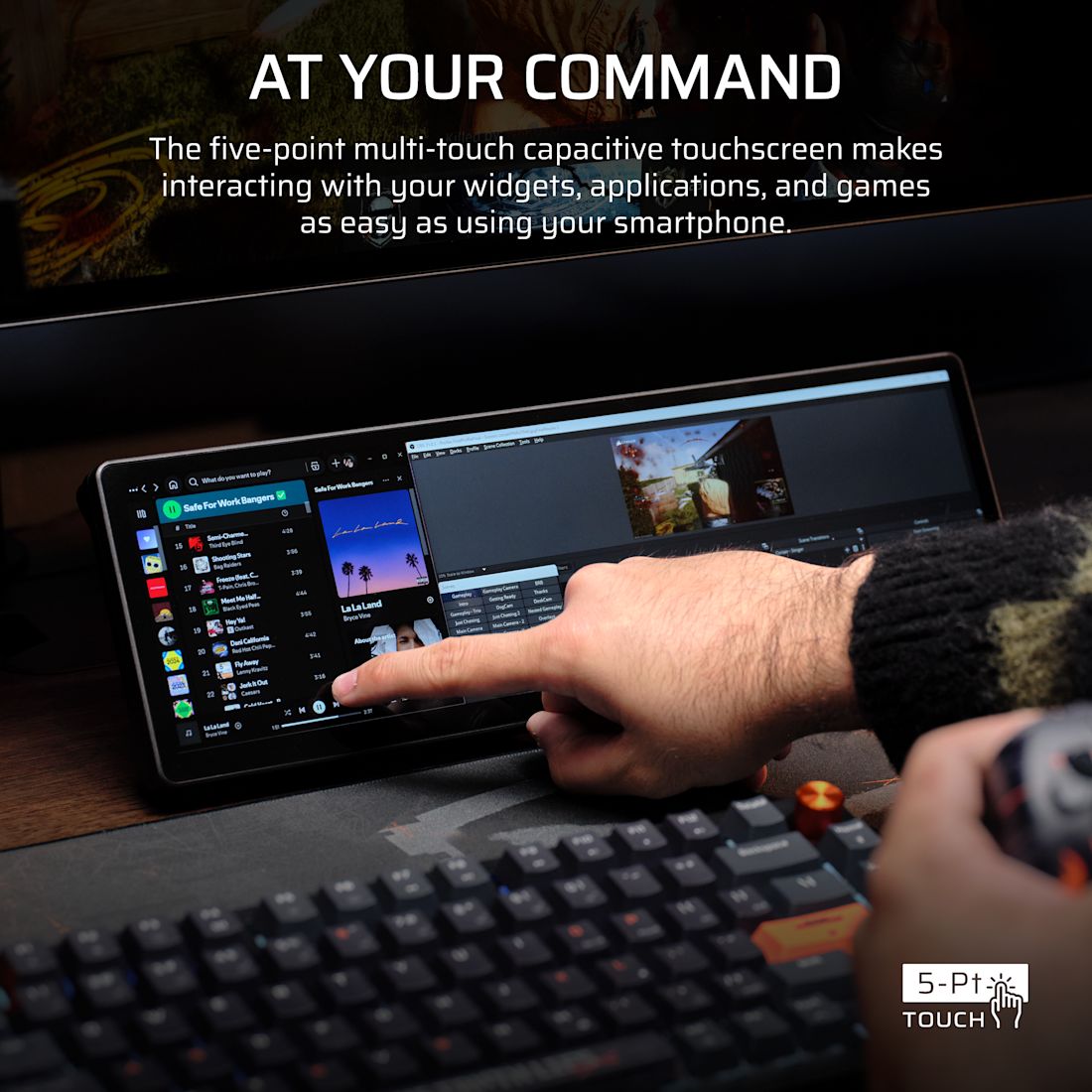
How a Perivue layout could look
Illustration of a Perivue custom widget layout. Not an actual product photo.
The hardware
14.5-inch 2560 × 720 ultra-wide (32:9) screen with five-point multi-touch. Mounts on its stand, magnetically to metal surfaces, or on a monitor arm with a standard ¼"-20 thread.
Custom widgets
Corsair iCUE widgets show system stats, calendar, weather and media out of the box. We build custom widgets (web technology based) for your network health, IoT sensors, call queues, tickets and alerts.
Touch controls
Runs Elgato Virtual Stream Deck, so every one-touch workflow we build can live on the screen as well as on physical keys, next to the live data it acts on.
- Always-on awareness: key numbers stay visible without switching windows or opening dashboards.
- Act where you look: see an alert and fix it with a touch on the same screen.
- Great for NOC, front desk and executives: each person gets a layout built for their role.
- Good to know: touch and widgets work on Windows with Corsair iCUE; on Mac and Linux it works as a regular extra display.
When something happens, the right action runs on its own
Event-driven automation listens for events from your sensors, cameras, network, phone system, calendar and applications, then runs the matching workflow instantly: alerting the right people, opening a ticket, changing a setting or kicking off an AI agent. No polling, no one watching dashboards, and every step is logged.
Connect and secure everything, from the office to the plant floor
We design and deploy Cisco IoT so sensors, cameras, machines and building systems connect securely and feed your automation with reliable data.
Industrial Routers
Cisco Catalyst IR routers with 4G/5G, SD-WAN and edge compute for remote and mobile assets.
Industrial Switches
Rugged Catalyst IE switches that speak industrial protocols such as EtherNet/IP, PROFINET and Modbus.
Cisco Cyber Vision
OT asset inventory and threat visibility that finds every connected device and insecure setting.
IoT Operations Dashboard
Cloud management for industrial networks, with Secure Equipment Access for remote vendor support.
Cisco Spaces
Smart-building platform that turns Cisco and Meraki Wi-Fi into occupancy and environment data, with partner sensors.
Meraki Smart Cameras
Cloud-managed MV cameras with on-camera analytics and motion events that trigger workflows.
Webex Devices
Room systems that report people count and room conditions, and run custom macros and controls.
AI-Assisted Workflows
Hand events to AI agents that investigate, summarize and recommend the next step.
From the first workflow review to a connected workplace
Every IoT and automation project follows the same proven lifecycle, start to finish, beginning with a small pilot that proves the value.
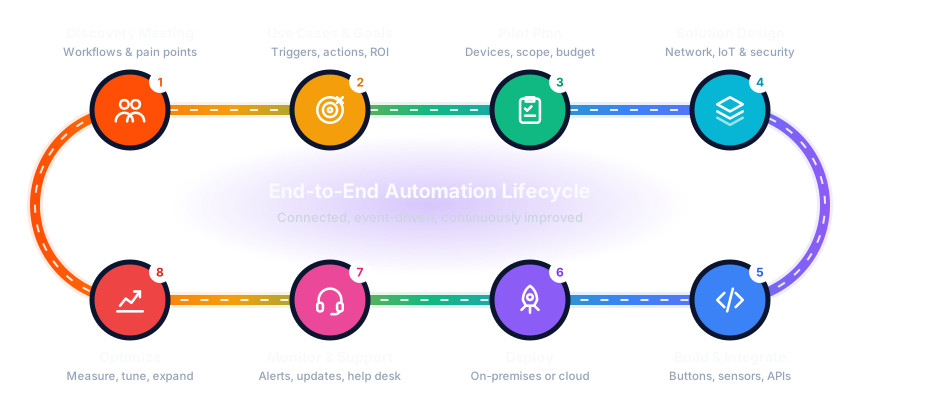
Discovery Meeting
We walk through your daily workflows, rooms and sites to find the repetitive tasks and the events that need a fast response.
Use Cases & Goals
We list triggers and actions, rank them by time saved and risk reduced, and agree on how success will be measured.
Pilot Plan
A focused pilot: which devices, panels and integrations, scope, timeline and budget, with a path to scale.
Solution Design
Network segmentation for IoT, device profiling, API access, event flows and button layouts, reviewed with you.
Build & Integrate
We configure panels and sensors, build the integrations and event rules, and test every workflow end to end.
Deploy
On-premises, in the cloud or hybrid, with documentation and hands-on training for the people who use it.
Monitor & Support
We watch device health and workflow results, apply updates and firmware, and support your team when needs change.
Optimize
We measure time saved and response times, refine the rules, and add new buttons, sensors and sites.
From the first walkthrough to the network closet



Connected devices, without new risk
Segmented IoT
IoT devices live on their own network segments, separated from business systems.
Known devices only
Cisco ISE profiling and policies admit only approved devices with the access they need.
Least-privilege APIs
Every button and rule uses scoped credentials, and no secrets are stored on the panels.
Full audit trail
Every event and automated action is logged, so you always know what happened and why.
What would you automate with one button?
Tell us about the tasks your team repeats and the events you wish you knew about sooner. We'll design a pilot that shows what event-driven automation can do for your business.